Effective network troubleshooting is crucial for maintaining a stable and efficient IT environment. As networks become increasingly complex, the ability to diagnose and resolve issues swiftly becomes essential for minimizing downtime and ensuring seamless connectivity. This guide provides a comprehensive overview of network troubleshooting, including solutions for common issues and best practices for effective problem resolution.
Understanding Network Troubleshooting
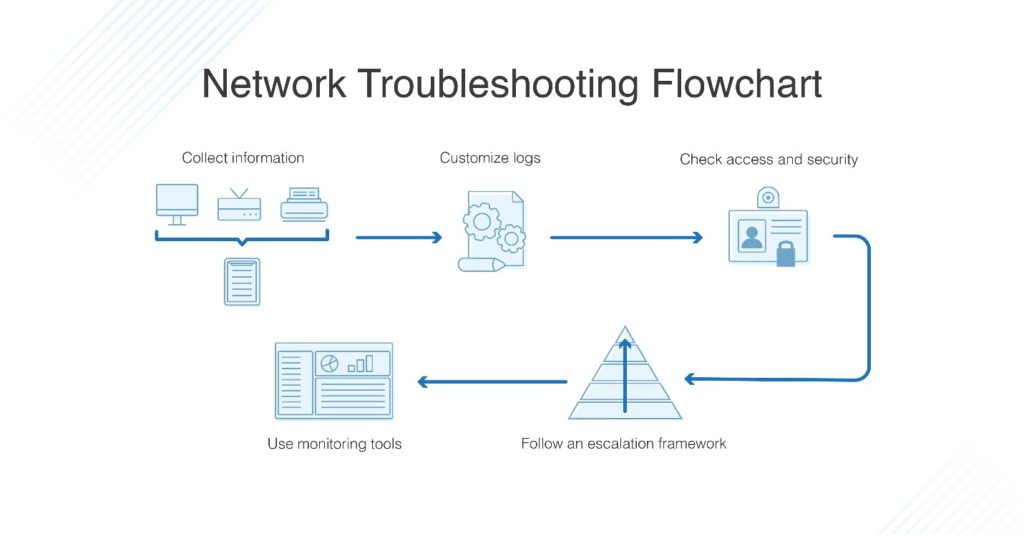
Network troubleshooting involves identifying and resolving problems within a network infrastructure. These issues can range from connectivity problems and performance degradation to security breaches and hardware failures. A systematic approach to troubleshooting helps network administrators diagnose and address these issues efficiently.
Common Network Issues and Solutions
1. Connectivity Problems
Identifying the Issue
Connectivity issues can arise from various factors, including hardware failures, incorrect configurations, or network outages. To diagnose the problem, start by verifying the physical connections and ensuring that all cables are securely plugged in. Use diagnostic tools such as ping and traceroute to test connectivity and identify where the connection fails.
Solutions
- Check Cables and Hardware: Inspect cables, routers, switches, and other hardware components for damage or loose connections. Replace faulty components as needed.
- Verify IP Configuration: Ensure that IP addresses, subnet masks, and gateways are correctly configured. Use command-line tools like ipconfig or ifconfig to check configuration settings.
- Restart Devices: Sometimes, restarting network devices can resolve temporary issues. Power cycle routers, switches, and computers to refresh connections.
2. Performance Degradation
Identifying the Issue
Performance issues can manifest as slow network speeds, high latency, or intermittent connectivity. Start by monitoring network performance using tools that measure bandwidth usage and latency. Check for network congestion or high traffic loads that may be affecting performance.
Solutions
- Optimize Bandwidth Usage: Implement Quality of Service (QoS) policies to prioritize critical applications and manage bandwidth more effectively. This helps ensure that essential services receive the necessary resources.
- Upgrade Hardware: Consider upgrading network hardware, such as switches and routers, to improve performance and support higher bandwidth requirements.
- Check for Interference: For wireless networks, ensure that there is minimal interference from other devices. Adjust wireless channels and positions to reduce signal overlap and improve connectivity.
3. Security Breaches
Identifying the Issue
Security breaches can compromise network integrity and data security. Look for signs of unauthorized access, such as unusual network traffic or unfamiliar devices on the network. Use security tools and logs to detect anomalies and potential threats.
Solutions
- Update Security Protocols: Ensure that firewalls, intrusion detection systems, and antivirus software are up-to-date and properly configured. Implement strong security measures to protect against potential breaches.
- Change Passwords: Regularly update passwords for network devices and user accounts to prevent unauthorized access. Use complex passwords and implement multi-factor authentication for added security.
- Review Network Access: Monitor and control network access by reviewing user permissions and restricting access to sensitive areas of the network.
4. Configuration Issues
Identifying the Issue
Configuration problems can lead to various network issues, including connectivity problems and performance degradation. Verify that network devices are configured correctly and consistently with network policies and standards.
Solutions
- Check Configuration Settings: Review and validate configuration settings for routers, switches, and other network devices. Ensure that settings align with network requirements and best practices.
- Use Network Documentation: Maintain accurate and up-to-date network documentation to help diagnose and resolve configuration issues. Document network diagrams, device configurations, and change logs for reference.
- Consult Networking Tutorials: Utilize networking tutorials and resources to understand best practices and troubleshooting techniques. These resources provide valuable insights and guidance for resolving configuration issues.
5. Wireless Network Issues
Identifying the Issue
Wireless network issues can include poor signal strength, intermittent connectivity, or network interference. Use wireless network analyzers to assess signal quality and identify potential sources of interference.
Solutions
- Optimize Wireless Settings: Configure wireless access points with optimal settings, including appropriate channels and transmit power levels. Avoid overlapping channels and minimize interference from other wireless devices.
- Relocate Access Points: Position wireless access points strategically to provide adequate coverage and reduce dead zones. Ensure that access points are placed away from physical obstructions and sources of interference.
- Update Firmware: Regularly update the firmware of wireless devices to ensure that they are running the latest software and security patches.
Enhancing Troubleshooting Skills
Enroll in Network Courses and Training
To enhance your troubleshooting skills, consider enrolling in network courses and networking training programs. These courses provide in-depth knowledge of network troubleshooting techniques and tools, helping you become more proficient in diagnosing and resolving network issues.
Pursue Network Certification
Achieving network certification such as the Cisco Certified Network Associate (CCNA) demonstrates your expertise in network troubleshooting and management. Cisco training and CCNA courses offer comprehensive coverage of troubleshooting methodologies and best practices.
Learn Networking Best Practices
Continuously improve your troubleshooting skills by learning networking best practices and staying updated with industry trends. Utilize resources such as networking tutorials and professional forums to gain new insights and techniques for effective network management.
Conclusion
Effective network troubleshooting is essential for maintaining a reliable and secure network infrastructure. By understanding common network issues and implementing best practices for diagnosis and resolution, you can ensure optimal network performance and minimize disruptions. Enhance your troubleshooting skills through network courses, networking training, and professional certifications to stay ahead in the ever-evolving field of IT networking.